The four mechanisms, and what each one is actually worth
“Access control” covers four quite different things on a product page. Knowing which one you are buying is the whole exercise.
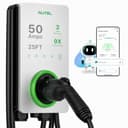
1. A card reader at the unit (RFID). You tap a card and the charger delivers current. This is the strongest of the four for a home, because the credential is physical: you can hand one to a houseguest or a tenant and take it back, and nothing depends on your router being up. Autel publishes RFID-card authentication for the MaxiCharger, with cards sold separately. Leviton publishes “Optional RFID Control” for the EV40P — with a caveat we cover below.
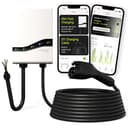
2. A named multi-user invitation. The brand lets you invite specific people, each with their own identity, so sessions are attributable. Emporia publishes this as Invite2Charge, which its own page describes as “multi-user access control for EV chargers”. This is the right shape for a household with two drivers, a duplex, or a driveway shared with a neighbour you are splitting the bill with.
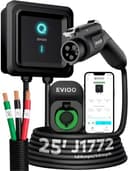
3. App start/stop on one account. The charger sits idle until the owner’s app says go. EVIQO publishes remote start/stop, scheduling, and consumption and cost tracking in its app, and that is a real gate — a stranger plugging in gets nothing. It is also the weakest of the four in practice, because there is one credential, it is yours, and sharing it means sharing everything.
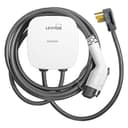
4. OCPP. Open Charge Point Protocol lets the charger take its authorisation decisions from a third-party back end rather than the manufacturer’s cloud. Leviton publishes OCPP 1.6 compliance for the EV40P. For almost every household this is irrelevant; for a landlord, a small HOA or anyone who wants to bill per kWh with software they choose, it is the only spec on this page that matters. Our condo and HOA guide is the companion read.
The Leviton caveat, stated plainly
Leviton’s EV40P listing advertises “Optional RFID Control”. On the same page, the ERFID card accessory is described as an “Additional Access Control (RFID) Card for use with Leviton EV320 and EV480 Level 2 Electric Vehicle Charging Stations” — two commercial station families, and not the EV40P.
Both of those statements are Leviton’s own, on the same page, on the date we read it. We are not going to resolve them for you by guessing, because which one is true decides whether you can authorise a charge with a card on this model or not. If card authentication is the reason you are buying, confirm it with Leviton for your exact model number before you order — or buy the Autel, where it is published against the product itself. What the EV40P unambiguously has is the My Leviton app, Wi-Fi 802.11 b/g/n, OCPP 1.6 compliance, and the deepest certification list in our registry. See our full EV40P review for the rest.
The chargers that cannot do this at all
Worth naming rather than quietly omitting, because “no app” is a feature we recommend elsewhere on this site and it is precisely the wrong feature here.
The Lectron NEXUS J1772 48Apublishes no app, no Wi-Fi and no account anywhere on its product page — Lectron sells the networked build as a separate SKU. It is a good charger and it is permanently open: energise the circuit and it will charge whatever is plugged into it. The same is true of the ELEGRP 40A, which has a delay timer on the unit and no radio, and of the Lectron 40A portable. If you specifically wanted a charger with nothing to log into, our no-Wi-Fi roundupis the page for you — just understand that it is also a roundup of chargers anyone can use.
Grizzl-E’s Classic Connect and Mini both carry the Grizzl-E Connect app over 2.4 GHz Wi-Fi, but United Chargers does not publish a card reader, a named multi-user invitation or OCPP for either, so they are not ranked here. The ChargePoint Home Flexis account-based and genuinely well-run software, but ChargePoint’s own Power Management FAQ names only its commercial CT4000 and CPF50 station families for the features people assume the Home Flex shares — so we are careful about what we claim for it on pages like this one.
A cheaper answer, if the problem is just your own household
If what you actually want is for the charger not to run at the wrong time rather than not to run for the wrong person, a schedule does that for free on anything with an app, and it costs nothing. Our time-of-use guide covers the version of this that saves money. If the concern is a shared circuit rather than a shared charger, the answer is load management, not access control, and our load-management roundup is the right list. And if you are hosting paying guests, our short-term-rental roundupweighs access control against the two other things a host needs — fitting every car that turns up, and per-session energy figures.
The verdict
If you want a credential you can hand over and take back, buy the Autel MaxiCharger. RFID cards are published against the product, the app and AutoStart are there as well, and the IP65 / NEMA 4X shell with a −40°F to 131°F range is the most weather-tolerant thing we cover — which matters, because an exposed driveway is where this problem exists. Buy the cards at the same time; Autel sells them separately.
If the people you are sharing with are people you know, buy the Emporia Pro. Invite2Charge is the only named multi-user mechanism in this group, you get 48 amps, ENERGY STAR and a 25 ft cable with it, and PowerSmart load management is there if the panel is tight — though it needs Emporia’s Vue monitor as a second device.
And if you only need the charger to stay dark until you say otherwise, buy the EVIQO 48A. App start/stop, per-session energy and cost, three schedules, 48 amps and the longest total reach here (a 25 ft cable plus a 40-inch input lead) for the least money on this page. One account, one credential, and no card to lose.