Plug & Range

Lectron Nexus NACS vs ChargePoint Home Flex NACS

If you drive a Tesla and never want to think about an adapter again, these are the two chargers on your list. The gap between them is an app — and an app you may already have in the car.

By Stephen V.Last updated How we pick

A native NACShome charger solves a small but genuinely annoying problem: the J1772-to-Tesla adapter that lives in your charge port, gets left at a friend’s house, or has to be unscrewed every time someone else needs to borrow the plug. Buy a NACS charger and the cable goes straight into the car.

Two units dominate that shortlist. Both are hardwired, both publish a 23-foot cable, both are outdoor rated, both carry ENERGY STAR listings and three-year warranties. The differences are two amps, an enclosure rating, and whether there is an app at all. That last one sounds decisive and mostly is not — here is why.

How this is funded:we earn a commission if you buy through our links, at no extra cost to you. It never changes which product we recommend, and we’ll tell you when we’d skip one. Full disclosure.

Quick picks

Ranked on published specs, charging speed, electrical fit and value. Select a row to jump to the full write-up. We have not bench-tested these chargers — here is exactly what we do instead.

#ProductBest forPrice
1
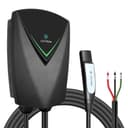
Lectron Nexus NACS (Tesla) Charger

Lectron Nexus NACS (Tesla) Charger

For a Tesla owner who doesn't want to babysit an adapter. The native NACS (J3400) connector goes straight into the car at a full 48 amps, with the safety listings you want to see. There's no app — but a Tesla schedules charging in the car anyway, so you're not really missing one.

Better value for most Tesla owners
$429.99 · View on Amazon

$459.997% off

Price as of September 2, 2026. #ad How we’re funded

2
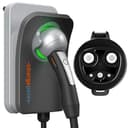
ChargePoint Home Flex NACS

ChargePoint Home Flex NACS

The Home Flex you already know, with a factory NACS cable. If you're a Tesla owner who wants ChargePoint's mature app and the same adjustable 16-50A amperage — instead of a plain no-app NACS unit — this is the way to get it. You pay a premium for exactly that.

Better if you want the app
$538.02 · View on Amazon

Price as of September 2, 2026. #ad How we’re funded

The picks in full

#1Better value for most Tesla owners

Lectron Nexus NACS (Tesla) Charger

For a Tesla owner who doesn't want to babysit an adapter. The native NACS (J3400) connector goes straight into the car at a full 48 amps, with the safety listings you want to see. There's no app — but a Tesla schedules charging in the car anyway, so you're not really missing one.

Strengths

  • Native NACS connector — no J1772-to-Tesla adapter to keep track of
  • Full 48A output and a weather-rated IP66 body
  • UL/ETL safety listings plus ENERGY STAR

Trade-offs

  • No Wi-Fi app — you schedule in the Tesla app instead
  • Best for Tesla/NACS cars; other EVs need a NACS-to-J1772 adapter
Max output48 A
Power11.5 kW
ConnectorNACS
InstallHardwired
Cable length23 ft
Warranty3 years
WiFi + appNo
CertificationsUL 2594/2231/2251 (ETL listed), ENERGY STAR, FCC

Our charging-speed math. At 48A (11.5 kW) and 3.5 mi/kWh, about 40 miles of range an hour into a Tesla.

Build note. A native NACS (J3400) connector plugs straight into a Tesla with no adapter; a holster is included.

Specs read from the manufacturer spec sheet, on July 19, 2026. “Not published” means the brand does not state that figure.

#2Better if you want the app

ChargePoint Home Flex NACS

The Home Flex you already know, with a factory NACS cable. If you're a Tesla owner who wants ChargePoint's mature app and the same adjustable 16-50A amperage — instead of a plain no-app NACS unit — this is the way to get it. You pay a premium for exactly that.

Strengths

  • Native NACS cable with ChargePoint's flexible 16-50A amperage
  • The most mature app of the NACS options here
  • 3-year warranty and an outdoor-rated NEMA 3R body

Trade-offs

  • The priciest NACS pick — you're paying for the app and the badge
  • 50A output needs a 60A circuit to use in full
Max output50 A
Power12 kW
ConnectorNACS
InstallHardwired
Cable length23 ft
Warranty3 years
WiFi + appYes
CertificationsUL/cUL listed, ENERGY STAR

Our charging-speed math. At its 50A ceiling (about 12 kW) and 3.5 mi/kWh, roughly 42 miles of range an hour into a Tesla.

Build note. The same Home Flex hardware with a factory NACS cable for Tesla and NACS EVs.

Specs read from the manufacturer spec sheet, on July 19, 2026. “Not published” means the brand does not state that figure.

The app question, answered honestly

The Lectron Nexus NACS has no app. The ChargePoint Home Flex NACS has what is, in our reading of the published feature sets, the most complete app of any NACS home charger: scheduling, reminders, usage history, and a mature platform behind it.

On a spec comparison sheet that looks like a knockout. In a Tesla driveway it mostly is not, for one reason: your car already does this.Every Tesla schedules charging from the vehicle — departure time, scheduled start, charge limit — and that schedule travels with the car. Plug in at a friend’s house or a rental and your settings come along. A charger-side schedule stays with the wall.

So for the single feature most people buy a smart charger for, the Tesla owner is the one buyer who genuinely does not need it. That is not a knock on ChargePoint; it is a statement about who is shopping. Our smart vs basic comparison makes the general version of this argument, and our smart charger roundup covers the features that do earn their keep.

What you lose with the Lectron is measurement. The car reports energy added to the battery; it cannot tell you what came through the wall, which is what your utility bills you for. If tracking real charging cost matters to you, that is the honest argument for the ChargePoint — or for a J1772 charger with energy monitoring plus the adapter, which our energy monitoring guide covers.

Fifty amps against forty-eight

ChargePoint is rated at 50 amps (about 12 kW), Lectron at 48 (about 11.5 kW). At our 3.5 mi/kWh reference that is roughly 42 miles of range per hour against 40.

Two miles an hour is inside the noise of how efficiently you happen to be driving that week. It should not influence this decision at all. Both units need the same 60-amp circuitunder the NEC’s 125% continuous-load rule, so there is not even an installation saving on the Lectron side — the panel requirement is identical.

The ChargePoint’s more useful flexibility is that its amperage is adjustable in software, which matters if your panel cannot carry 60 amps and you need to dial the charger down to fit the circuit you can actually get. Our panel capacity guide covers finding that ceiling, and our load management guide covers the options when it is tight.

Enclosure: IP66 against NEMA 3R

This is the one spec where the cheaper unit is ahead on paper. Lectron publishes IP66— dust-tight and protected against powerful water jets. ChargePoint publishes NEMA 3R, which covers falling rain, sleet and ice formation but is a less demanding rating than Type 4 or IP66 against wind-driven water.

For a garage or a sheltered wall, both are more than adequate and this is worth nothing. For a fully exposed outdoor wall it is a real edge to the Lectron. And for a genuinely severe climate, neither is our pick — neither brand publishes an operating temperature range for these models, which is the figure that actually speaks to a hard freeze. Our outdoor roundup and our Autel vs Grizzl-E comparison cover what to buy when the wall really is exposed.

Certification: both properly listed

Lectron publishes ETL listing against UL 2594/2231/2251 plus ENERGY STAR and FCC. ChargePoint publishes UL/cUL listing plus ENERGY STAR. Both are certified by an accredited laboratory against the right EV supply equipment standards, and both will satisfy an inspector.

The ENERGY STAR listing on both is the practically useful part, because a number of utility rebate programs require it by model number. Our rebates guide covers what those programs typically ask for. If you are wondering whether a certification mark is worth caring about at all, our are cheap chargers safe guide explains why it is the single spec we would never compromise on.

The option neither of these is

Worth saying plainly: you may not need a NACS charger.Every Tesla ships with a J1772 adapter, and a J1772 charger plus that adapter works perfectly well. That route opens the entire market to you rather than the two units on this page, which usually means more charger for the money — our main roundup is the field.

What you trade is the small daily friction the adapter introduces, and the risk of misplacing it. Some people find that genuinely irritating and some never think about it. Our best chargers for Tesla roundup lays out both routes properly, and our J1772 to Tesla adapter review covers the adapter route if you go that way.

The verdict, by buyer

Buy the Lectron Nexus NACS if you drive a Tesla, schedule charging in the car like almost every Tesla owner already does, and would rather put the money into the charger than into an app you will not open. The IP66 enclosure is a bonus if the wall sees weather, and the ENERGY STAR listing keeps rebate eligibility open.

Buy the ChargePoint Home Flex NACSif you want measured energy data rather than the car’s estimate, if you want amperage you can dial down in software to fit a constrained circuit, or if you value a large vendor with a long track record behind the firmware. It is the premium option and it is priced like one.

Buy neitherif you are not sure the adapter genuinely bothers you. Try living with it for a month first — it costs nothing, it came with the car, and if it turns out not to annoy you, the whole J1772 market opens up.
Frequently asked questions

Do I need a NACS charger for a Tesla?

No. Every Tesla ships with a J1772 adapter, and a J1772 home charger plus that adapter works fine. A native NACS charger removes the small daily friction of the adapter and the risk of misplacing it. Going the J1772 route opens the whole market to you and usually means more charger for the money.

Which is better, the Lectron Nexus NACS or the ChargePoint Home Flex NACS?

For most Tesla owners, the Lectron. Its missing app matters less than the spec sheet suggests, because a Tesla already schedules charging from the car and that schedule travels with the vehicle. Choose the ChargePoint if you want measured energy data rather than the car's estimate, or software-adjustable amperage to fit a constrained circuit.

Is the ChargePoint's extra 2 amps worth anything?

No. Fifty amps is about 42 miles of range per hour at our 3.5 mi/kWh reference against 40 for the Lectron's 48 amps — a difference inside the noise of ordinary driving efficiency. Both also need the same 60-amp circuit under the NEC's continuous-load rule, so there is not even an installation saving.

Can a non-Tesla EV use these NACS chargers?

Only with a NACS-to-J1772 adapter, and you should check that the adapter and your vehicle both support the current involved. If your household has a mix of Tesla and non-Tesla EVs, a J1772 charger plus the Tesla's own bundled adapter is usually the simpler answer.

Which has the better outdoor rating?

The Lectron, on paper. It publishes IP66 — dust-tight and protected against powerful water jets — against ChargePoint's NEMA 3R, which covers falling rain, sleet and ice but is less demanding against wind-driven water. For a garage or sheltered wall the difference is worth nothing; for a fully exposed wall it is a real edge.

Sources

Keep reading